Showing posts with label Reviews. Show all posts

Monday, June 27, 2011

Tech Review 2011 Part 2

Every now and then, I like to point out products and services that either really stink on ice, or perform really well and deserve praise.  I am happy to say this post revolves around the latter.  (Click here and here to read about other product and service reviews).  This post is Part 2 from my Tech Review 2011Part 1 post.

So, with every good phone, you need a good Bluetooth.  I am a very particular Bluetooth type of guy, meaning, I am weird.  I do not like things sticking in my ear; it irritates the hell out of me.  Everyone at my gym uses ear buds, and I get the chills – my ears actually hurt for them.  I am the only guy in there using full sized studio headphones while working out – I like the speakers the cup over my ears.  So, like my old phone, I held on to my old Bluetooth because it met my weirdness criteria.  It was a Motorola H350 with a partially open arm that went over the ear. 
My original Motorola H350
The speaker was relatively flat, so it did not protrude into the ear canal.  The only problem was the arm of the unit wasn’t very stiff, so if I leaned to the side that it was on, it would pull away from my ear or fall off entirely.  However, it had good sound quality, and a decent range, plus I didn’t use it that often given that when I was on the phone, I really wasn’t doing anything else, e.g., texting or web surfing, in other words, I didn’t need my hands free.  However, it finally died soon after I got my new phone.  No really, it did – I started using it everyday, and the speaker just gave out.  After 4 good years of service, it was time to replace it.  However, just like with ear buds for MP3 players, everyone loves the kind that sticks in your ear.  So, the hunt was on.  First, I tried the Motorola HK200. 
The Motorola HK200
Similar in design to the H350, this unit was lighter, and a bit more snug to the ear, however, the quality just wasn’t there.  The sound quality and volume was poor, and the person on the other end had a hard time hearing me. On top of that, there was a small ear bud type projection on the unit.  So, the thin plastic arm went around your ear, and then, through the course of the day, the ear bud piece would work its way into my ear.  This was a no go.  Unfortunately, Best Buy, Radio Shack, Target, Wal-Mart and others all carry the same basic Bluetooth headsets, and none of them were what I wanted.  It was time to hit the web (and that will be discussed next).  So, I started the hunt, just using broad search terms, which would lead me to the big outlets in the beginning – Best Buy, Wal-Mart, etc.  Then I started digging deeper and deeper until I ended up on some random site at the end of the Internet universe.  But, there it was – the perfect Bluetooth headset.  It was unique looking.  It went over the ear.  The speaker was completely flat.  I must have it.  It is called the Maverick Lifestyle Nica Sunrise Bluetooth headset.  The what? 
The Maverick Lifestyle Nica Sunrise Bluetooth available in black and red.
I started looking for reviews and doing my research, and about 90% of what I read was positive.  So, I found it on Amazon.com and placed my order.

So, here is where I am an old fashioned kind of guy.  I love walking into a store, trying out an item, playing with it, asking the clerk about it, and walking out with it that very day.  I am not a fan of online ordering for several reasons.  What if they ship me the wrong thing?  What if I get double charged?  What if my credit card info is stolen?  What do you mean the shipping and handling is more then the item itself?  What if it’s defective, where is customer service so I can return it?   All of these issues and more often kept me from ordering anything off the Internet, but this Bluetooth was exactly what I was looking for and it was not available in any physical store – believe me, I looked.  So, after much assurance from Allie, I placed my order through Amazon.  After 4 days, it arrived in the mail.  I turned it on, paired it with my phone with no issues. However, some sort of weird echo type reverb could be heard during calls.  Plus, the range from my phone was about 8 inches and would randomly disconnect from the phone.  So I tried re-pairing the phone, recharging the unit, restarting my phone – nothing worked.  So, since the reviews were good, I figured it must be defective. 

Here we go – the fight to get this thing replaced.  So, I was actually pleasantly surprised at how easy it was to replace it. I went to Amazon.com, filled out the replacement request, printed out my documentation and within 4 days, my new unit arrived with 30 days to return the defective one. 

The new unit works awesome.  I leave the phone in my office, and walk to the other end of the house without an issue, the call quality is clear and it is extremely comfortable. The Sunrise also comes with arms for both the left and right ears, as well as a basic recharging cable.  You can also order custom skins for your unit, as well as an upgraded desk dock and a car charger. I highly recommend this unit and Amazon.com for a hassle free shopping experience.
The car charger.

The upgraded desk dock.

An example of available skins, or create your own!
Do you have a favorite phone?  How about a Bluetooth (or other hands free) headset that you would recommend?  What online shopping experiences have you had and with what companies?

Hope to hear from you, and thanks for reading!

Thursday, June 23, 2011

I’m Geeking Out, You Monster…..

As I have stated before, I am a video game junky, although, now that I think about it, I think I’m more of a video game snob, as opposed to anything else.  Modern Warfare and GTA/ Liberty City are two of my all time favorites; Modern Warfare because of its fast action and amazing attention to detail and GTA because of its beautiful gaming environment specifically as it relates to their version of New York City.   Recently, my father in law, Dan, introduced me to Portal 2.  He described it as a cool 3D puzzle solving game, to which my initial thought was “ehh, I’ll give it a try”.  Dan’s description of the game really didn’t do it justice (sorry, Dan).  From the moment is started playing, I was hooked.  The environments are so beautiful and grand, the characters and fun and memorable (with some pretty funny dialogue), and the amount of thought put behind each challenge is staggering.
The entire game is based around an evil super computer named Glados that is forcing a captive human (you) to perform in a series of mentally challenging tests.  Each test takes place in a room of her design, and you, as the test subject, have to use what is available in the room to complete the challenge.  The only thing that you have with you as a constant is a portal gun – a device that creates a temporal gateway from one location instantly to another. 
The Portal Gun
One of the many test environments
Glados - She makes life very difficult for you....
The catch is that only certain wall types will hold a portal.  Along the way, you meet Wheatley, a small “core” that helps you here and there during the course of the game and, well – you’ll see.
Wheatley
Throughout the game, there are a bunch of other little characters each with there own unique personalities - my favorites, the turrets....
Searching.... There you are...
The game’s maps range from ultra cool, futuristic and minimalistic settings to vintage environments ranging from the 1950’s to the 1980’s; all with unique details and challenges. 

The co-op part of the game is just as fantastic.  The characters, Atlas and P-Body, are test robots designed to carry out the constant testing of Glados.
Atlas and P-Body on a mission...
Each test will challenge you and your partner and will either create a stronger bond between the two of you, or possibly tear you both apart, making you bitter enemies to the end.  I am happy to say that my wife and I did not fall prey to the latter.

So, if you haven’t noticed by now, I love this game, and has definitely earned a spot in my top 3 favorites.  I spent a week straight playing it to its conclusion, simply loving every second of it.  I loved it so much, that I was moved to design my own Portal 2 inspired room.
My room inspired by Portal 2
For those of you that noticed, you will see the back round of my blog has changed.  It is, in fact, my Portal 2 inspired space.  Yes, the ultimate geek-out. 

I plan to get the first Portal game in the very near future, as I have a serious need to keep testing.  Thanks for reading!

Resting.

Saturday, June 18, 2011

Tech Review 2011 Part 1

Hello All.  It has been a while since my last post, but I have been busy working on a new concept.  As of right now, I cannot get into detail about it, but as soon as I can, I will and post images. 

Every now and then, I like to point out products and services that either really stink on ice, or perform really well and deserve praise.  I am happy to say this post revolves around the latter.  (Click here and here to read about other product and service reviews).

Cell Phones

For a long time, I mean a really long time, I had a flip style cell phone.  To be specific, it was the Sanyo SCP 7050 – key word – RUGGEDIZED flip phone from Sprint

My Old Sanyo SCP 7050 Flip Phone
This thing was awesome.  I could throw it at a wall, run it over with my car, drop it in water and it would just keep working every time.  I never had an issue with it, so I never upgraded the phone.  I was 4 years past due for an upgrade by the time I went to the Sprint store.  Every time I got the itch to get a new phone, the first thing I would ask the clerk was “where are the indestructible phones?”  I would often get a puzzled look, and I would proceed to explain just how durable my flip phone was.  Of course, they would proceed to tell me that there is no phone like that one, so I would leave with my trusty Sanyo.

However, eventually, my tech side got the best of me, and in the world of mini laptops and net books, iPads, iPhones, and affordable smart phones, I decided it was time for me and my wife to upgrade.  After much toiling and playing at the Sprint store, I decided to go with the HTC Evo Shift built on the Android platform, and Allie went with the LG Optimus.  

The HTC Evo Shift

The LG Optimus
This really is a great little device.  I have found that, with the exception of writing a document, this phone has essentially replaced my laptop.  It goes with me everywhere, I use it for texting (which I NEVER did on my old phone), web searches with Google Voice, GPS, as an MP3 player, portable television, and of course, Angry Birds.  The versatility of the phone has been truly amazing, and its reliability has been, well, above average.   My old flip phone had to be restarted due to lock up, seriously, twice that I can remember.  There have been a few instances with this phone due to trying to do too much at once, or an over abundance of updates.  The other thing that I really like about this model is the slide out keyboard.  At 6’-4” tall, I have been blessed with large hands so the little glass touch screen keyboard it not going to cut it.  The keyboard on the EVO Shift is a bit on the small side, but with some practice, I have managed just fine.  As far as ruggedness goes, I purchased a hard plastic cover that mounts to the back of my phone.  It then has a second hard cover that slides over the glass faceplate of my Evo and locks in place to the back piece.  When the phone is not in use, or attached to my hip, it is secured in its own hard plastic cocoon.  Should I upgrade the phone in the future, I may look more into something like the Samsung Galaxy, which my father-in-law recently purchased. 

The Samsung Galaxy
The screen is bigger then my Evo Shift’s, therefore typing on the screen is a little easier.  However, it is so light, I feel like I am holding a Noisy Cricket.

"I feel like I'm gonna break this damn thing!"

Monday, March 28, 2011

The Storage Turd 5000

My wife and I have proudly held our heads high when it comes to renovating our home.  We have worked hard on making our floors, walls, bathrooms and kitchen as pretty as we can possibly make them.  We were also very happy with the exterior of our house – it needed some work, but it was still nice and certainly passable.  Then God intervened.  In early October of 2010, the Phoenix Valley was slammed with not one, but two wicked hail storms in the same day and my new neighborhood was right in the middle of it.  After the storm, I, like many of my neighbors filed claims with their respective insurance companies, and work began (and is still going on) all around the community.

Hailstones in our front yard.
One of the larger hailstones.
Our damage bill included the roof, A/C unit, large section of fence, the patio cover and our shed.  TECA Roofing (who I highly recommend) did a fantastic job repairing or replacing everything, except our shed.  Apparently, shed replacement was the one thing that TECA did not do.  But, my wife and I gave it a “whatever”, and concentrated on the big stuff that was being repaired; the shed was damaged, but it was still standing.  As the larger items were nearing completion, Allie and I started shed shopping, along with everyone else in the Valley.  Wonderful.  Just about every place in Phoenix was sold out of sheds, and the few that were remaining were very expensive, so we delayed our purchase for a little while longer.  Finally, we found one well within our price range – things were now in motion.

First, we had to get rid of the existing shed. 
The original shed, the Storage Turd 1000.
Allie and I did not want to deal with the demolition of the old shed so we sold it on Craigslist. The person who bought it also removed it and hauled it away. 

Next step – painting the trim and laundry room of the house.  With the money we saved on the new shed (and with what we made on the old shed), we were able to hire house painters for a little bit of a touch up.  The fact is some of the paint was peeling, so with the old shed gone, the time was just right to paint (the original shed was placed up against the laundry room wall, so with the shed gone, that wall could be accessed).  We hired Richard Dumholf and his crew who did a fantastic job for a very reasonable rate.  In the Phoenix Valley, he can be contacted at 602-525-8904.

The front of our house with the original trim color.
A closeup of the original trim (shown with some storm damage).
The house with our new trim color.
Close up of the new trim color and house numbers.
After two days of painting, the job was completed and the new shed was delivered from Home Depot and it was time to build. 

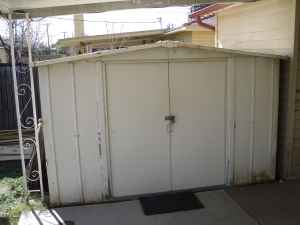
The shed we bought is a pretty basic Arrow storage shed measuring 10’ wide by 8’ deep with a maximum height of 7’ at the ridge line.  It had a smaller footprint then the original, but at least I could stand up in it (the original only had a height of 6' at the ridge line).  The entire box that it came in was about 7’ long by 3’ wide and only 6 inches thick.  EVERY part was going to have to be assembled.  Tons of panels and what looked like thousands of little screws, bolts and washers of varying shapes and sizes lay inside our cardboard Pandora’s Box.  And, just as with the real thing, once it was opened we couldn’t close it back up.  As a matter of fact, Allie had looked up “Arrow Shed Construction” on YouTube and she found a video of a man describing his experience.  Most notable, he mentioned that he couldn’t PAY anyone to help him, and it took 3 weeks for him to build.  Ugh.  Allie and I had to take a step back, reaffirm our love for each other, and get to work.

Of course, about an hour in, we asked: "why did we do this to ourselves" and "why, God, why"?  Well, we were committed, so no point in whining about it, right?

Step one, the floor kit. This actually wasn’t so bad.  After clearing away the old floor (the buyer of the old shed did not want it) and re-grading the ground, we were able to lay down the aluminum floor supports in a fairly short amount of time.  Then, weather delay.  As we were about to start building the walls, the wind kicked up.  The directions for the shed clearly stated not to build in windy conditions. Unfortunately, we had already started putting up the corners for the walls, so we had to disassemble what we had erected above the floor frame (we left the frame in place) and call it a day.  We picked up construction bright and early on the following Saturday morning and continued into the waning daylight of Sunday evening.

Floor kit assembly with corner wall posts and bracing
(this was after the wind delay).

We started with the walls, again, followed by laying down the plywood deck for the floor.

Walls with exposed floor frame.
Walls with plywood deck.
Close up of deck over frame - I used self tapping screws
to bite into the aluminum framing.
After the deck was down, it was time to finish the walls.  By now, Allie and I were pretty tired, and a little overwhelmed by what lay ahead of us – namely the roof.  But, we pressed on….

Completed walls with floor and roof gables.
The roof was probably the most challenging part of the whole thing, as most of the work had to be done on a ladder while holding large panels and tiny screws.  After fighting with the roof for what felt like forever, we were done with the really hard stuff.  Lastly, we had to add trim and the front doors.  A couple of hours later, and the whole shed was finished.
Inside ceiling support.
Ceiling support toward front door.
We survived.  We didn’t kill each other. There was no ritual suicide involved.  We are not divorced.  The shed did not beat us.   However, at the end of the day, it is just a shed.  It is not pretty or fancy, and it is not the first thing we will be showing out guests who visit.  After all of the large renovation projects that we have done, this one, though laborious and large, just seemed sort of “eh” when all was said and done.  Hence the name, Storage Turd 5000.
The completed Storage Turd 5000. It's not so bad!
Should you decide to attempt to build one of these things, here is some advice:
1. Be patient.  Seriously, this is going to take some time  - Rome was not built in a day, and neither is an  Arrow Storage Shed.
2. Have a helper ready to go - you're gonna need them.
3. Be nice to your helper!
4. Keep your instructions near by at all times and re-read them again and again.
5. Keep track of your parts.  We separated out all of our pieces by number.  This will save you a lot of time and aggravation.
6. We found gloves to be very helpful - the panels are thin and sharp - you could really hurt yourself, so be careful.
7. Think outside the box - the directions are a little vague in some places, as are the diagrams.  There also seemed to be some gaps in the instructions.  So, think ahead and take nothing for granted.  This is only a partial paint-by-numbers project - you will need your brain!

Good Luck!

Friday, December 24, 2010

Which Route(r) Should I Take?

The wireless age.  It is a fantastic time to live in when it comes to networking several computers together.  It is also a wonderful invention when your cable connection is on the exact opposite side of your home, so your options are: 1. drill holes in your ceilings and walls, crawl through your attic and run 100 feet of Ethernet cable or, option 2: go wireless.

This is the story of option 2.

In every place that I have lived, at least one computer was wireless, and therefore I have probably used every router in existence, especially at my current home.  You see, in the 1950’s, when my house was built, a personal computer wasn’t even a thought in most people’s head, let alone wireless connections. Therefore building a house to accommodate a wireless connection was not something that anyone considered.  Another thing to remember about the 50’s is that people knew how to build a house. My house could probably survive a nuclear strike, if it had to.  The exterior walls are block construction with vinyl siding, and the interior walls use 6” x 12” stud construction with lathe board, dry wall and chicken wire (which is key to this story) with a thick hand plaster coating.  Yep, they knew how to build ‘em.

Enter into the arena, the first router, a Belkin Play “N” series router with a 300mb/s transfer rate antennae. 


This router worked great at my last apartment, which was only 800 square feet, and the computer sat about 20 feet away from the router with a clear line of sight, so the connection and speed was fantastic. Not so much in the new home.  The distance from the router to the computer is roughly 50 feet, which is not a great distance. However, the line of sight is apparently far more incredibly important then I originally thought.  Going in a straight line from the router to my computer, the signal must pass through 4 of those heavy duty plaster lined walls.  The Belkin failed to achieve this feat.

Next up on deck was the Apple Airport Extreme. 


I figured, why screw around with anything in the Belkin Play category, let’s get right into the big leagues.  So, off to Best Buy to purchase the Apple router. 

Before I continue, I feel it is necessary to inform you that another major disadvantage going for me is my internet service provider – Cox Communications.  Simply put, they stink on ice.  On most days, two tin cans and a string work better then anything Cox can offer.  As a matter of fact, if you have an alternative service provider in your area, then use it. 

Unfortunately, Cox Communications has somewhat of a monopoly in the area, so I have to use them. Cox’s modem of choice is the Motorola SURFboard SBV5422 Digital Voice Modem and Integrated DECT Cordless Phone System.

 
This thing sucks, too. I have been through 3 of them.  I mention all of this because while all of the routers that I will be discussing have had issues in one form or another, there is a good chance that my ISP and modem are to blame as well, so take all my reviews with a grain of Cox Communications’ provided salt.

Anyway, back to the router. The set up was fairly simple – my PC recognized it right away. My Mac, on the other hand, did not, due to the fact that I am still using Mac OS X v 10.4 operating system.  I know, I need to upgrade.  The Airport Extreme requires Leopard at least to operate with maximum efficiency.  However, the Mac was able to connect despite the lack of a software upgrade with the existing built in wireless card, it just had a weaker signal. I noticed that my signal on the PC was still very weak, and my connection was extremely poor, with a transfer rate of 13.5mb/s.  Unacceptable.  So, I went back to Best Buy and purchased the Airport Express – a device that is supposed to extend the range of the Apple Extreme router.


This did not happen.  My computer wanted to recognize the Express as the router, as opposed to the Extreme.  There was constant conflict between the two devices, and one would cancel out the other.  In addition to that, my signal was still extremely poor. Nope, Apple cannot contend with Cold War Era construction.

Next up: the Cisco Systems Linksys E3000.

 
Fail.  I mean all the way around, fail.  My computers could not connect with the router at all.  The signal was so weak that it could not get past the initial set up connection during the installation process.

Finally, we come to the winner, a Netgear N300 wireless router. 

 
Surprisingly, this is a middle of the road unit.  The reach of the signal is not as far as the Apple Airport and the E3000, but is markedly stronger.  I have to say, the installation process was a pain in the neck.  Not particularly hard or anything, just a pain in the neck.  I had to take my tower, monitor, keyboard and mouse to the router and run a hard-line Ethernet connection between the tower and the router to establish communication.  Once communication had been established, the rest was easy.  However, even though the signal quality was stronger, the router still had issues penetrating the walls of my house.  The signal was still hit or miss. 

Then, my tech savior, Rusty, gave me this handy little device called a Rosewill RNX-G1 antennae.


The installation of the antennae was extremely simple, and this ended up being the missing link, the solution to the problem.  The down side is that the maximum transfer rate is 54mb/s.  However, since the signal is strongest with this setup, I am able to use every bit of the 54mb/s.  Even though the other routers had a 300mb/s rating, the signal was so weak, I was lucky to get 20mb/s. 

With the stronger signal from both the router and the antennae, my signal has been strong, steady and interruption free.

Remember at the beginning of this post, I mentioned the chicken wire that supports the plaster?  Apparently, the chicken wire was dispersing the signal from the other routers to the computer; after all, the router’s broadcast frequency is just a radio signal.  Every router uses a different frequency to broadcast their signal.  Apparently, the Netgear Router uses a frequency that can penetrate the inner structure of my 1950’s walls.

For anyone trying to select a wireless router for their homes or office, I hope this blog helped. Something to remember that I did not in the beginning of my search for a router is the construction of the space around you and most importantly, the construction of any walls that may be between the router and the computer that it is serving.